
Hello and welcome back! It’s great to have you here for another episode of Architecting Zero Downtime.
Today, we’re diving deep into a topic that is absolutely critical but, I find, is often misunderstood:
Proxmox Storage Architecture
Specifically, we’re going to talk about why setting up compute high availability (HA) is only winning half the battle.
This is a big one, because getting it wrong doesn’t just reduce your resilience—it can create a false sense of security that’s arguably more dangerous than having no HA at all.
Let me paint a vivid picture, one I’ve seen play out more times than I can count.
A talented team builds a beautiful multi-node Proxmox cluster. They meticulously configure High Availability, run all the failover tests, and watch with satisfaction as a simulated node failure causes virtual machines to restart on another host in mere seconds.
It’s magic.
They feel secure.
They feel resilient.
They feel… done.
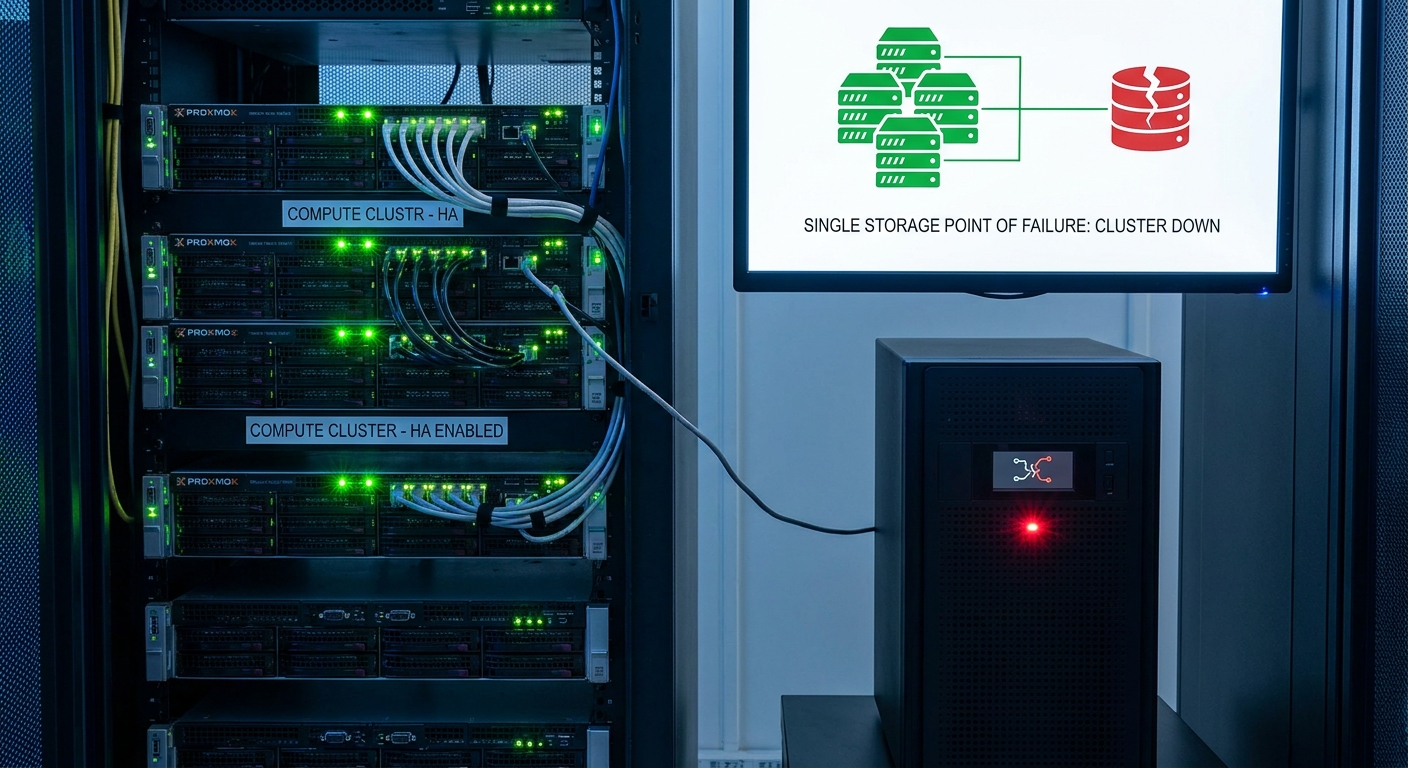
The problem is that they’ve often just shifted their single point of failure—not eliminated it.
By connecting this brilliant, redundant compute cluster to a single, non-redundant NAS or SAN, they’ve created an Achilles’ heel for their entire operation.
If that one storage box fails, the whole cluster goes dark.
This episode is about closing that gap.
We’re going to explore why storage is the other, equally critical, half of the high availability equation.
What Proxmox HA Actually Does (And What It Doesn’t)
First, let’s get crystal clear on what standard Proxmox HA actually does.
In a properly configured cluster, the system is like a vigilant flight controller, constantly monitoring the health of your virtual machines.
If one of the physical host servers suddenly fails—perhaps a power supply dies or a motherboard fails—the HA Manager detects this immediately.
It then automatically restarts those affected virtual machines on another healthy node in the cluster.
I like the analogy of having a hot standby pilot for an airplane.
If the primary pilot is incapacitated, the co-pilot seamlessly takes control.
The plane doesn’t fall out of the sky.
The journey continues.
But here’s the crucial distinction.
This process only protects the compute aspect of the VM.
It moves the running brain—the CPU and RAM state—to new hardware.
This is only possible if the new host can still access the VM’s virtual disk.
The storage—the VM’s long-term memory—must already be available from the new location.
This entire mechanism relies on mature, battle-tested technologies such as:
- Corosync for cluster communication
- Fencing to safely isolate failed nodes
It’s a fantastic system.
But it has one fundamental dependency:
Accessible shared storage.
The Classic Trap: The Single Box of Failure
This brings us to the design pattern responsible for many completely avoidable outages.
The classic mistake.
A team builds a beautiful Proxmox cluster…
…and then connects every node via NFS or iSCSI to a single standalone NAS or SAN.
At first glance this seems perfectly logical.
Centralised storage is easy to manage.
Unfortunately, this is where everything breaks.
If that single storage appliance fails:
- Controller failure
- Power supply failure
- Firmware issue
- Hardware fault
Every virtual disk immediately becomes unavailable to every node.
Proxmox HA becomes completely powerless.
It knows the VMs need restarting.
But their disks no longer exist.
It has the brain.
The body has disappeared.
What was supposed to be a high availability event becomes a complete cluster-wide outage—all because of one overlooked storage dependency.
The Local Storage Dead End
You might now be thinking:
“I’ll just use local storage on each Proxmox node.”
And you’re right.
For pure I/O performance, local storage such as:
- LVM
- ZFS
can be fantastic.
Unfortunately, it creates another fatal problem for High Availability.
I often describe this as putting your data in jail.
If a motherboard dies…
If a CPU fails…
The VM disk is physically trapped inside that failed server.
The remaining cluster cannot access it.
Proxmox HA is willing to restart the workload.
But the disk itself cannot move.
At this point you’ve transitioned from:
High Availability
to
Disaster Recovery.
Your only option becomes restoring from backups.
Which completely defeats the purpose of designing a zero-downtime platform.
The Two Paths to True Storage Resilience
So where do we go from here?
The answer is to stop thinking of High Availability as a feature…
…and instead design resilience into the architecture itself.
There are two primary approaches.
1. Resilient Shared Storage
Storage remains centralised…
…but the storage platform itself becomes highly available.
The storage is no longer a single point of failure.
2. Distributed Storage
This is the Hyper-Converged Infrastructure (HCI) approach.
Using software such as Ceph, the local disks inside every Proxmox node become one large distributed storage system.
Storage is no longer centralised.
Instead, it becomes self-healing and distributed across the cluster.
These are the two architectural roads available.
Either:
- Build an incredibly resilient storage platform.
or
- Remove the central storage platform entirely.
Path One: Fortifying the Citadel with Resilient Shared Storage
Instead of thinking about a storage appliance…
Think about a storage system.
Enterprise storage platforms eliminate every single point of failure.
Key design features include:
Dual Controllers
If one controller fails or is upgraded…
The second immediately takes over.
Redundant Power Supplies
Each controller has independent power.
Ideally supplied by separate PDUs and electrical circuits.
Redundant Connectivity
For iSCSI:
Always implement Multipath I/O (MPIO).
For NFS:
Use LACP link aggregation across multiple switches.
This ensures that one failed cable or switch never disconnects storage.
The good news is that this level of resilience is no longer limited to expensive enterprise hardware.
Solutions such as TrueNAS High Availability can provide enterprise-grade resilience on commodity servers.
The principle remains the same.
Your storage appliance is no longer one box.
It’s effectively its own highly available cluster.
Path Two: The Elegance of Distributed Storage with Ceph
Personally, this is the architecture I find most elegant within a Proxmox environment.
Rather than building a separate storage cluster…
Ceph integrates storage directly into the compute cluster.
It pools the local disks from every node into one distributed storage fabric.
One that is:
- Intelligent
- Distributed
- Self-healing
When data is written to Ceph…
It doesn’t create one copy.
It typically creates three replicas.
Each replica is stored on different disks in different physical hosts.
If an entire server fails…
Ceph doesn’t panic.
It simply recognises that replicas have disappeared…
…and automatically rebuilds them elsewhere.
The storage heals itself.
This is what enables:
- Live Migration
- True High Availability
- Continuous storage availability
for every node.
Choosing the Right Architecture
So which approach should you choose?
It depends on your:
- Budget
- Operational model
- Team expertise
My general rule of thumb is:
Dedicated HA SAN
Advantages
- Clear separation between compute and storage
- Familiar enterprise operational model
- Storage specialists manage storage
Disadvantages
- Higher capital cost
- Potential vendor lock-in
Ceph Hyper-Converged Infrastructure
Advantages
- Excellent scalability
- Lower hardware costs
- Compute and storage scale together
- No dedicated storage hardware
Disadvantages
- More operational complexity
- Requires an excellent network
- Overall cluster health directly affects storage performance
There isn’t one universally correct answer.
Only the architecture that best fits your organisation.
My Non-Negotiable Rule: The Network
Regardless of which storage architecture you choose…
Everything depends on the network.
This is my one non-negotiable rule.
A serious Proxmox deployment should always include:
- Dedicated storage network
- Redundant switching
- Minimum 10 Gigabit Ethernet
- Complete separation from management and VM traffic
Building high availability on an underpowered storage network is like constructing a skyscraper on sand.
Eventually…
It will fail.
Trust, But Verify
Building the solution is only half the job.
The other half is proving that it works.
The only way to truly trust a High Availability platform is through deliberate failure testing.
Pull power cables.
Disconnect storage links.
Simulate failed switches.
Watch what happens.
Verify that the environment behaves exactly as designed.
Because an untested HA platform isn’t really High Availability.
It’s simply a theory.
Final Thoughts
The key lesson from today’s discussion is simple.
Proxmox High Availability provides compute resilience.
It does not provide complete infrastructure resilience.
True zero downtime only exists when storage is designed with the same level of resilience as the compute layer itself.
Whether that means:
- A dedicated HA SAN
- Hyper-Converged Ceph
the principle never changes.
Your storage must be every bit as resilient as the workloads it supports.
Next Episode
In Episode 11 we’ll move from resilience to speed.
Join me for:
Performance Tuning Proxmox: Getting the Most from Your Hardware
We’ll explore how to unlock the full performance potential of your cluster—not just keep it online.
Until then…
Happy architecting!
And, as always, I’d love to hear your questions and experiences in the comments below.
Leave a Reply