
Hello and welcome back to Architecting Zero Downtime Infrastructure!
This is episode eighteen, and today we’re tackling a topic that’s incredibly powerful but often misunderstood: Snapshots, Clones, and Backups.
Now, we’ve spent a good deal of time on hardware resilience—protecting our data from the physical failure of a disk drive with technologies like RAID. And that’s fantastic! But what happens when the threat isn’t a dying disk? What about the far more common, gut-wrenching problems, like an administrator’s typo, a software update that goes sideways, or something more malicious, like ransomware?
For these challenges, RAID is completely helpless. It will happily write your corrupted data across all its disks. We need a different class of tool, one that operates at a higher level. Today, we’re going to explore the powerful, instantaneous data protection capabilities built right into the very file systems we use every day.
What Exactly is a Snapshot?
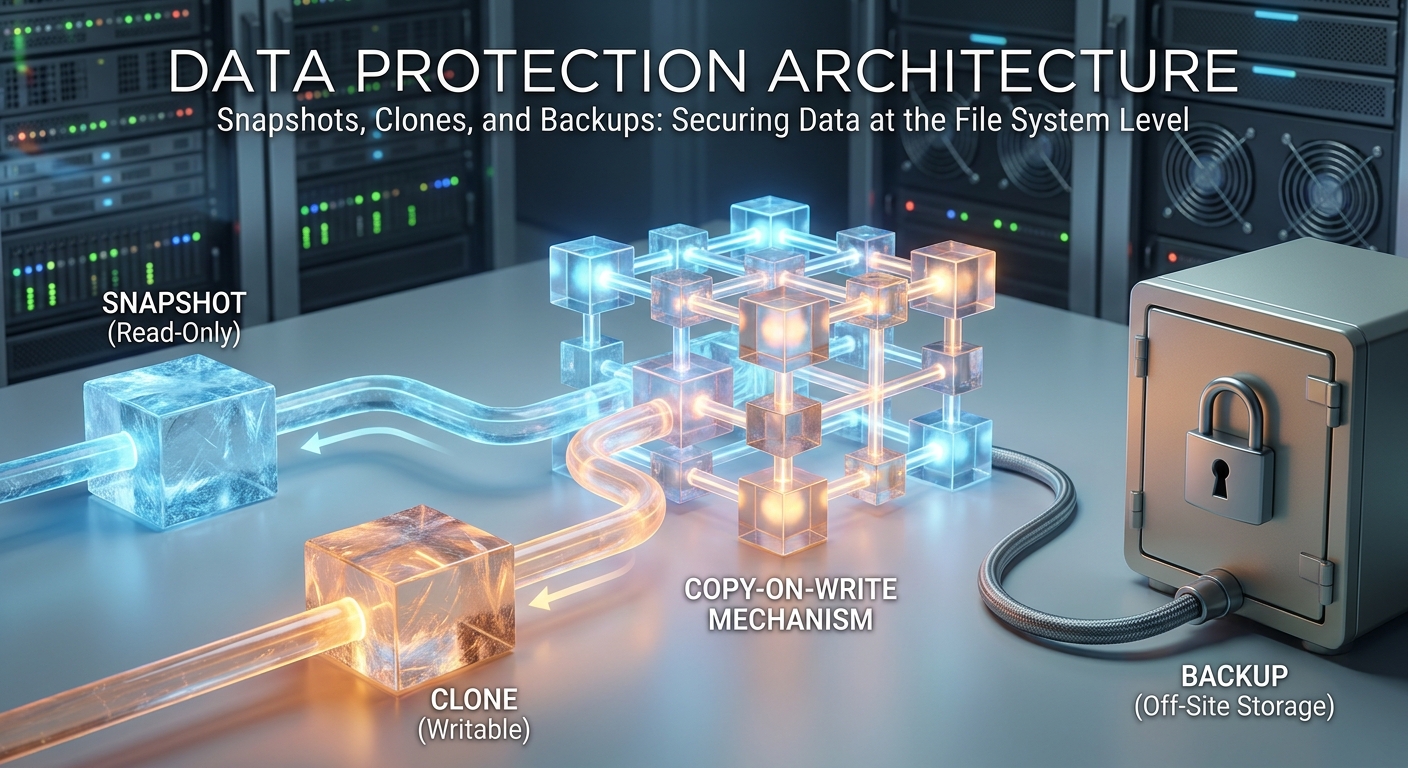
Let’s start with the core concept. The simplest way I find to think about a snapshot is as a perfect photograph of your data. Imagine your entire file system, with all its files and folders, frozen in time. When you take a snapshot, you are capturing a perfect, read-only view of what that system looked like at that precise second.
But here’s the critical detail, and the part that makes this technology so magical. A snapshot is not a full copy of your data. If you have a terabyte of data, taking a snapshot doesn’t suddenly consume another terabyte of disk space. In fact, when you first create it, it uses almost no space at all.
This is because a snapshot is essentially just a list of pointers… a map that points to the original data blocks on your disks. It’s an instantaneous reference, not a time-consuming duplicate.
The Magic Behind the Curtain: Copy-on-Write (CoW)
So, you might be asking, “How is this even possible?” How can we get an instant, space-efficient copy of potentially terabytes of data? The mechanism is really quite elegant, and it’s a concept called Copy-on-Write, or CoW for short.
Think about a more traditional file system. When you edit a file and hit save, the system often overwrites the original data blocks on the disk with your new information. The old version is just… gone. Poof.
A Copy-on-Write file system, like ZFS or Btrfs, takes a beautifully robust approach: it never overwrites live data. When you modify a file, the file system writes the new data to a completely new, unused block. Then, it just updates its internal map to point to that new location.
And that’s the key! The snapshot we took? Its map is still pointing to the original, untouched data blocks. They were never overwritten… they were simply left alone, perfectly preserved. That’s why it’s so fast. There’s no heavy lifting, no mass data copy. We’re just creating a new set of pointers.
The Ultimate ‘Undo’ Button for Your Server
Now that we understand the mechanics, let’s talk about where this becomes incredibly valuable in the real world. I’ve always thought of snapshots as the ultimate ‘undo’ button for a server.
Take a common, high-stakes scenario: a major operating system patch or a complex software deployment. There’s always that little knot of anxiety in your stomach. My unbreakable rule is to take a snapshot just moments before the process begins.
If the upgrade goes smoothly, wonderful! We simply delete the snapshot and move on. But if something goes horribly wrong—if the system becomes unstable or applications start crashing—we don’t start a painful, hours-long restore from tape. We simply roll back. The entire system reverts to its pre-upgrade state in seconds. It’s a complete game-changer.
Or consider a more modern threat: ransomware. Because snapshots are inherently read-only, the ransomware can’t touch the data they contain. This means you can roll the system back to the state it was in minutes before the attack. It turns a catastrophic, potentially business-ending event into a manageable incident.
From Snapshots to Clones: The Writable Sibling
The read-only nature of snapshots is their greatest strength for protection, but sometimes you need a copy of an environment that you can actually work with. This is where the next logical step in this technology comes in: the clone.
The easiest way to think about it is that a clone is simply a writable version of a snapshot.
There’s a very clear parent-child relationship:
- First, you create your read-only snapshot (the parent).
- Then, from that snapshot, you instantly create a clone (the child).
Just like its parent, the clone is created in a fraction of a second and initially consumes almost no new disk space. It’s still just pointing back to all the original data blocks held by the snapshot. The moment you start writing to the clone, however, the copy-on-write process begins again, and only your changes—the delta—begin to consume new storage.
This incredible efficiency is where clones really begin to change how you operate. For me, one of the most powerful applications is in development and testing. My process is to create a ‘golden image’ of an application or database, get it set up perfectly, and then take a snapshot. From that single snapshot, I can instantly provision dozens of fully writable clones, one for each developer. No more waiting hours for multi-terabyte databases to copy. It is proliferation… without the penalty.
My Most Important Rule: Snapshots Are NOT Backups
It’s easy to get excited by the power of these tools, but I need to pause here for what is the most critical distinction we will make today. I want to be absolutely clear:
Snapshots are not backups.
Say it with me. Snapshots are not backups. They are brilliant for rapid, operational recovery, but they share a fundamental, fatal weakness with your live data. Your dataset, your snapshots, your clones… they all live on the same physical storage system. If that system fails—if the entire array goes offline due to a hardware fault or a site-wide power outage—you will lose everything. The production data, and every snapshot along with it.
This is why a robust architecture always incorporates what we call the 3-2-1 rule: three copies of your data, on two different media types, with one of those copies located securely off-site. Snapshots are an essential part of a modern strategy, but they are not, and never can be, a substitute for a true backup.
Engineering a Perfect Backup Strategy
So, if a snapshot isn’t the backup itself, what is its proper role? The answer is that a snapshot becomes the perfect source for the backup.
Think about the challenge of backing up a live, busy server. Files are changing, databases are in flight. It’s a moving target, and you risk capturing an inconsistent, even corrupt, state.
The workflow I’ve found to be most reliable is a simple, three-step process:
- Quiesce: Briefly pause writes to the application (for a database, this is often called a ‘hot backup’ mode).
- Snapshot: Take an atomic snapshot. This is instantaneous. The moment it’s created, the live application can resume full operation.
- Backup: Run your backup job against the read-only snapshot. Your backup system can now take its time, reading from a perfectly frozen, consistent point in time, while your production system carries on completely unaffected.
This is how we move from hoping for a good backup to engineering one.
Where To Find These Superpowers
This technology is more common than many people realize. In my own work, the system I consistently rely on is ZFS. It was built for this from the ground up, and its zfs snapshot and zfs clone commands are a model of clarity. But this isn’t a ZFS-only feature:
- In the Linux world, Btrfs offers similar capabilities.
- If you use a Mac or an iPhone, Apple’s APFS file system uses this technology extensively under the hood.
- In the high-end enterprise world, this has been a cornerstone for decades in dedicated storage systems from vendors like NetApp.
The point is, this is not some exotic, experimental feature. It is a proven, foundational component of modern data management.
Tying It All Together
What we’ve established today are three foundational principles for modern data protection at the file system level:
- Snapshots: Our instant, read-only points in time that act as a server’s undo button.
- Clones: Our space-efficient, writable copies that let us provision entire environments in seconds.
- The Golden Rule: Neither of these tools replaces a true, off-site backup. They are powerful components of a strategy, not the strategy itself.
This, of course, leads to the next logical question. We’ve mastered creating these powerful, consistent snapshots on our primary machine. But how do we get them to another system to protect ourselves from a complete site failure?
That is precisely what we’ll cover next time. Join me for Episode 19, where we’ll dive into ‘ZFS Replication: Your First Step Towards Disaster Recovery’.
Thanks for reading, and I’d love to hear your thoughts or questions in the comments below! Talk to you next time.
Leave a Reply