
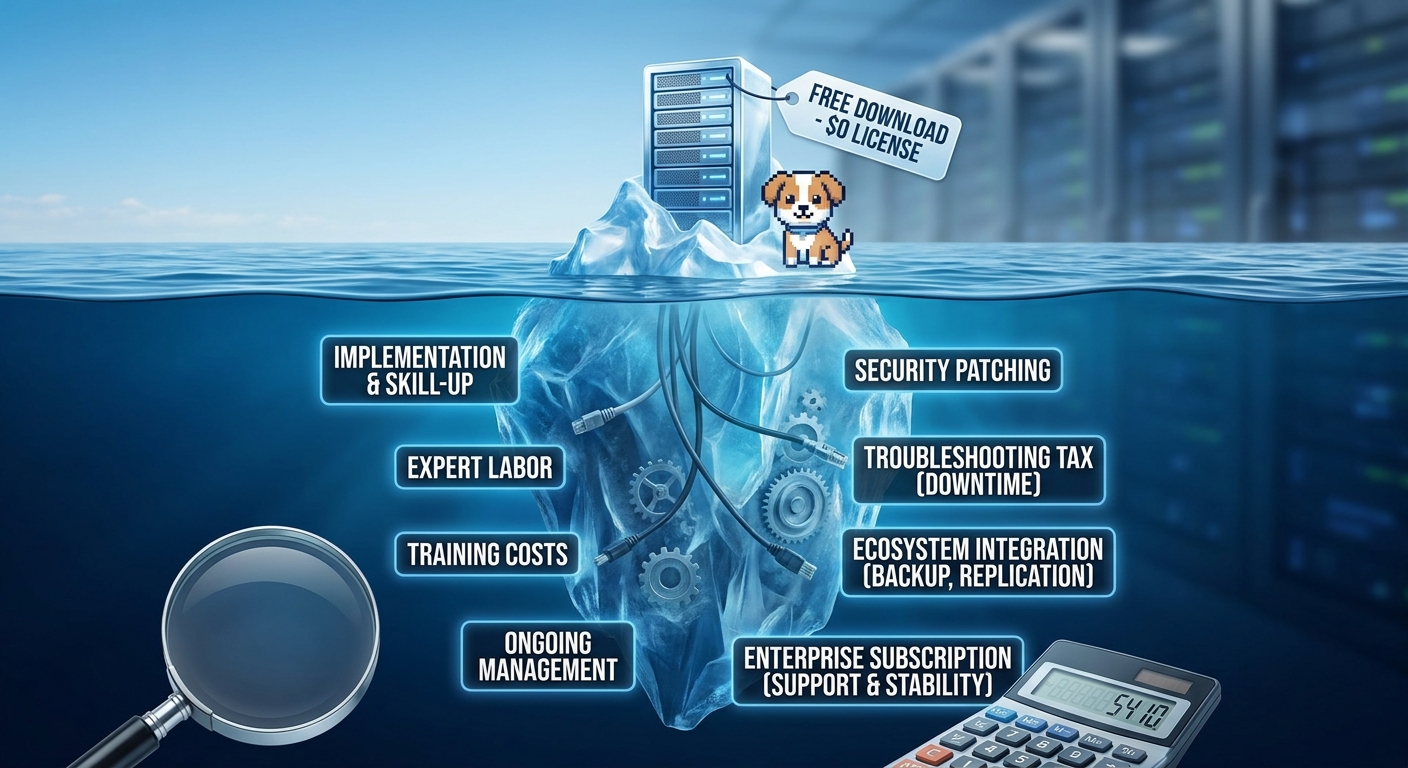
Hello and welcome back to the blog! It’s great to have you here for another episode of Architecting Zero Downtime Infrastructure. Today, we’re diving headfirst into a topic that I see trip up even the most seasoned teams during architectural reviews: the powerful, alluring, and often deceptive nature of the word ‘free’.
More specifically, we’re going to build a framework for calculating the Total Cost of Ownership (TCO) for popular open-source hypervisors like Proxmox or XCP-ng. That zero-dollar price tag is incredibly tempting, isn’t it? It feels like you’re getting a massive head start on your budget. But as we’ll explore today, that ‘free’ license is just the first page of a much longer story. Over the course of this post, we’re going to deconstruct what that actually means for your budget, your team’s time, and your overall risk profile, revealing the very real expenses that hide in the shadows.
The ‘Free Puppy’ Problem
To really get our heads around this, we need to separate two very different ideas of ‘free’ that get thrown around in the open-source world. You’ll often hear the terms ‘gratis’ and ‘libre’.
- Gratis means free of charge, as in, it costs no money.
- Libre means freedom, as in liberty—the freedom to see the code, modify it, and control your own destiny.
The illusion we’re tackling today lives almost entirely in that first word. Let me paint a vivid picture for you, one I come back to again and again: the free puppy analogy.
Imagine someone offers you a puppy, completely free of charge. Wonderful! But is the puppy really free? Of course not. That’s just the beginning. The real cost—the true TCO—is in the food, the vet bills, the training classes, the chewed-up furniture, and the time commitment. Our infrastructure is no different.
The hypervisor download is your free puppy. The hardware compatibility research, the expert labor required for a high-availability setup, the ongoing support model… those are the vet bills. And trust me, you will be paying them, one way or another.
Cost Bucket #1: The Starting Line & The ‘Skill-Up’ Tax
This is where your TCO meter officially starts running, often before you’ve even powered on a server. With a commercial solution like VMware, you typically start with a Hardware Compatibility List (HCL)—a clear, pre-vetted guide to what works. It’s a huge time-saver.
With many open-source platforms, what I often see is the team spending dozens of hours just in research, trial, and error, simply to validate that their chosen servers, network cards, and storage controllers will play nicely. That’s a direct, and often unbudgeted, labor cost right out of the gate.
Then you get to the architecture itself. Setting up a truly resilient, high-availability cluster isn’t just a few clicks in a wizard. You might find that properly configuring shared storage, networking, and cluster quorum requires a level of expertise that needs to be either developed internally or hired externally. This brings us to training—not just the course fees, but the opportunity cost of pulling your senior engineers off other valuable projects to skill up. All of this happens before you’ve migrated a single production workload.
Cost Bucket #2: The Daily Grind & The ‘Troubleshooting Tax’
Now, let’s talk about what is almost always your most significant ongoing expense: the human factor. Day-to-day management, applying security patches, performance tuning, health checks… these tasks are constant.
With many open-source platforms, these processes can require more manual effort. You’re not just clicking an ‘update all’ button in a centralized manager; you’re potentially orchestrating a multi-step, command-line-driven process across your cluster that your team had to design, document, and learn themselves.
But the real hidden cost emerges when something inevitably breaks. I call this the ‘troubleshooting tax’. This is the very real cost of your most senior (and expensive) engineer spending three hours on a Tuesday afternoon digging through forums and mailing list archives to solve a cryptic error on a storage controller. You’re paying for their time, but more critically, you’re paying with risk and potential downtime. This is where you have to honestly ask: how does that unpredictable cost compare to a commercial support contract with a guaranteed 30-minute response time?
This also creates a business continuity risk I see all too often: the single in-house ‘guru’. This is the one person on the team who really knows how the whole thing works. When your platform’s stability rests on one individual, you’re carrying a significant, unquantified risk that becomes painfully obvious the day they go on vacation or, worse, leave the company.
Cost Bucket #3: Mind the Gap – Assembling Your Ecosystem
When you invest in a commercial platform, you’re often buying into a tightly integrated suite of tools. Advanced backup, disaster recovery replication, and sophisticated virtual networking are often engineered to work together as a single, coherent system.
With the open-source approach, you’ll often find you need to assemble this ecosystem yourself. Proxmox, for instance, pairs wonderfully with a tool called Proxmox Backup Server. But it is a separate deployment. It’s another system to provision, secure, update, and master. The responsibility for integrating these critical components—and ensuring they continue to work reliably together after every single update—falls squarely on your team. This is that classic ‘some assembly required’ cost, adding both potential software fees and significant integration labor to your TCO.
The Sanity Check: The Enterprise Subscription
It’s easy to see the paid enterprise subscriptions offered by projects like Proxmox or for XCP-ng (via Xen Orchestra) as a failure of the ‘free’ model. My unbreakable rule is to view it differently: see it as a critical and non-negotiable component of your TCO calculation for any serious production environment.
What are you actually buying? You’re not just getting a license key; you are purchasing stability and predictability.
- Validated Updates: You gain access to enterprise repositories where patches have been more rigorously tested for production environments. This isn’t the bleeding edge; it’s the stable edge.
- Professional Support: You’re buying a direct line to the experts who build the software. That ‘troubleshooting tax’ we just talked about? This is the insurance policy against it.
My personal process is to put the annual subscription cost on one side of a ledger, and the fully-loaded cost of my senior engineers’ time spent self-supporting on the other. Very quickly, you’ll find that the subscription is a powerful risk mitigation strategy that buys you peace of mind.
Let’s Make It Tangible: A Simple TCO Framework
Okay, let’s build a simple framework to make this real. The way I like to calculate TCO is with a clear formula:
TCO = (Initial Setup Labor) + (Annual Subscription) + (Annual Management Labor) + (Potential Cost of Downtime)
Now, let’s apply this to a standard three-node cluster for a small business:
| Expense Category | Breakdown | Estimated Cost |
| Initial Setup | Senior engineer labor (approx. 40 hours @ $100/hr) | $4,000 |
| Ongoing Management | Patching, health checks, minor adjustments (60 hours/yr) | $6,000 |
| Enterprise Subscription | Modest fee for stable updates and professional support | $2,000 |
| Total First-Year Cost | (Before factoring in financial impacts of unplanned downtime) | $12,000 |
Suddenly, your ‘free’ platform has a very real first-year cost of $12,000. When you run these numbers honestly, you might be shocked to find that the open-source TCO is much closer to, and can sometimes even exceed, the initial licensing cost of a commercial alternative.
Beyond the Spreadsheet: The Strategic Equation
A TCO spreadsheet is an essential tool, but the analysis can’t stop there. I always encourage teams to look at the intangible, strategic side of the equation.
On the one hand, commercial products come with the very real strategic cost of vendor lock-in. Your architecture, your operational knowledge, and your automation scripts become deeply tied to one company’s roadmap and licensing model. This often comes with the quiet threat of a licensing audit, which no one enjoys.
On the other hand, open-source provides strategic freedom. These systems are typically API-first by design, which allows for a level of deep customization and automation that is often impossible with proprietary platforms. You aren’t forced to upgrade on someone else’s schedule, and you don’t have to worry about a critical feature being deprecated. The platform is truly yours.
Ultimately, this is a fundamental choice: the predictable stability of a commercial vendor versus the ultimate flexibility and control of an open platform. That’s a decision that goes far beyond the numbers on a spreadsheet.
So, Where Does ‘Free’ Win?
So, when does the open-source TCO model actually work in your favor? My personal rule of thumb is that the TCO is most favorable in these scenarios:
- Where Expertise Already Exists: Think of a tech-forward small business with a deep bench of Linux talent. For them, the labor cost for management is naturally lower, making the entire model far more attractive.
- At Massive Scale: For hyperscalers or large enterprises with thousands of hosts, the cost of per-socket commercial licensing becomes astronomical. At that point, funding an internal team of experts is the obvious financial decision.
- Dev/Test Environments: These are a perfect place to leverage the freedom of open-source without the stringent uptime requirements and support needs of production.
Your First Step, Not Your Last Word
If there’s one thing I hope you take away today, it’s that ‘free’ is simply the starting point of the conversation, not the conclusion. Before you commit to any platform—open-source or commercial—your first step should be to build a comprehensive TCO model. Be brutally honest about the numbers: the cost of your team’s time, the price of subscriptions for stability, and the potential business cost of an outage.
Making that calculation isn’t just a box-checking exercise; it’s the very foundation of a sound architectural decision.
Now that we’ve established this framework, the next logical step is to see it in the wild. That’s exactly what we’ll be doing in our next episode, where we’ll walk through a real-world example.
I hope you’ll join me for Episode 13: ‘Case Study: Migrating a Mid-Sized Enterprise to Proxmox’. We’ll get an on-the-ground view of the challenges, the unexpected costs, and the ultimate rewards of making that switch.
Until then, thank you for reading! I’d love to hear your own stories about calculating TCO in the comments below. Have you ever been surprised by the hidden costs of ‘free’? Let’s talk about it.
Leave a Reply