
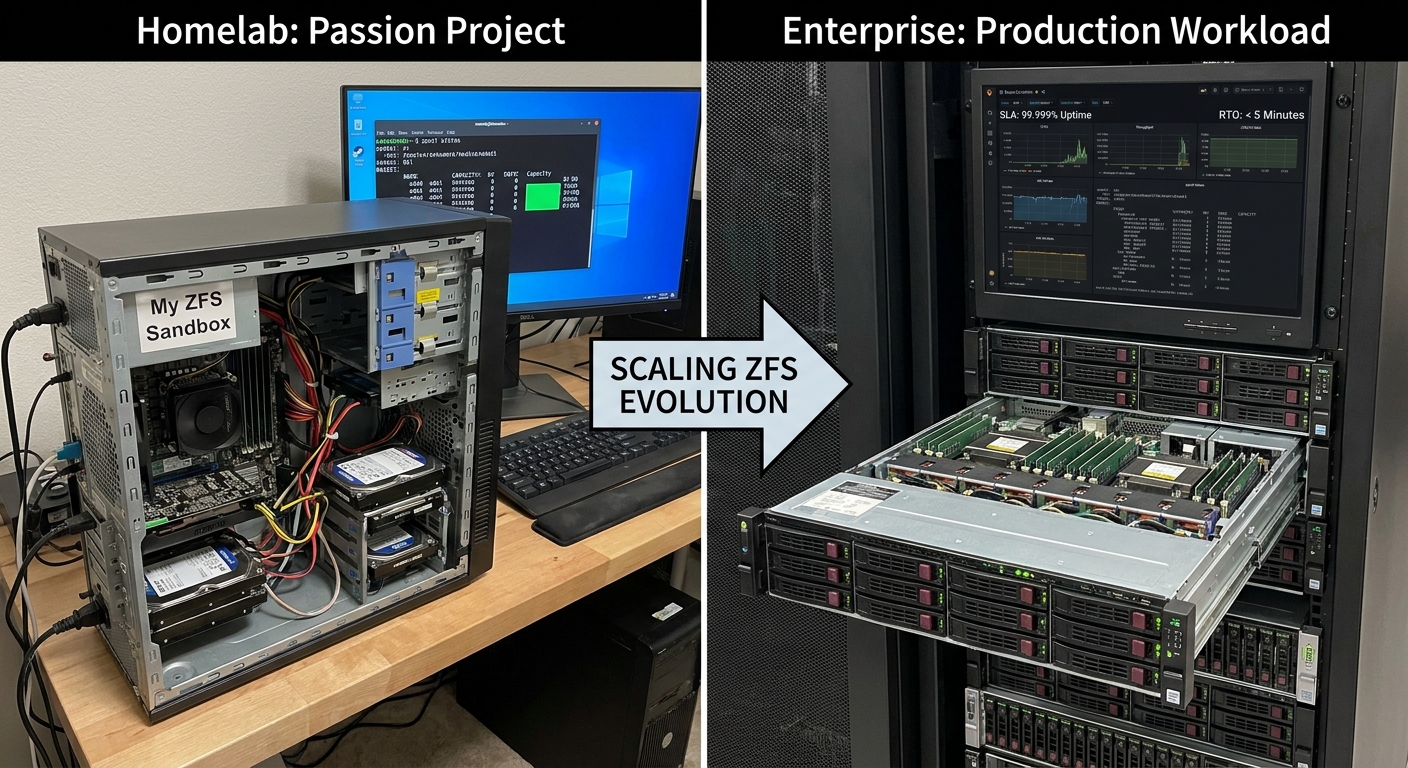
Hello and welcome back to Architecting Zero Downtime Infrastructure! This is episode twenty-one, and today we’re taking a journey that I know many of you will find intimately familiar. It’s a story of growth, evolution, and a fundamental shift in mindset. We’re going from the familiar comfort of the homelab to the high-stakes world of production workloads with ZFS.
For so many of us, ZFS begins as a passion project. It’s that wonderfully flexible, impossibly powerful tool we set up in a corner of the house to learn, experiment, and safeguard our personal digital lives. But here’s the thing: the principles that make a great homelab don’t always translate directly to the demands of the enterprise. When real money and real business operations are on the line, the entire conversation changes.
It’s no longer just about protecting our data; it’s about protecting the business. Downtime stops being a minor inconvenience and becomes a direct, and often painful, financial liability. So today, we’re going to walk through how we evolve that ZFS foundation. We’ll explore how to take the brilliance we discovered in our homelabs and engineer it for the unforgiving world of enterprise uptime.
Our Starting Point: The Wonderful World of the Homelab
Let’s begin where most of us start our ZFS journey: the homelab. It’s a fantastic environment, one driven by curiosity, a thirst for knowledge, and, let’s be honest, a pretty tight budget.
What I often see—and what my first ZFS box looked like—is a system built on good consumer hardware. Maybe it’s a repurposed desktop or a custom-built tower, likely humming along with standard, non-ECC memory. The storage array is typically a charming collection of SATA drives, maybe of different sizes, brands, or ages, because the primary goal is maximizing every last gigabyte for personal projects, family photo backups, or that ever-expanding media library.
The VDEV layout is often a simple, wide RAIDZ1. This makes perfect sense when you’re trying to get the most usable space from the drives you have on hand. It’s a fantastic, cost-effective environment for learning the ropes of ZFS. It’s the ideal sandbox… but it is just that, a sandbox. It was never designed to withstand the pressures of production.
The Enterprise Mindset Shift: From ‘If’ to ‘When’
This is where the most critical transformation happens, and it’s not in the hardware—it’s in our heads. The enterprise environment is, by its very nature, unforgiving. We move away from experimentation and into a world governed by contracts and consequences.
I’m talking about things like Service Level Agreements (SLAs), which are formal, written promises of uptime that we make to our customers or internal departments. We also operate under Recovery Time Objectives (RTOs), which define precisely how quickly a service must be restored to avoid a critical business impact.
Why the formality? Because in production, downtime is measured in currency. It’s lost revenue, failed e-commerce transactions, a halt in manufacturing operations, and damage to the company’s reputation. And so the core question we ask of our storage system has to change.
It’s no longer, ‘Can I recover my data after a failure?’.
The professional question becomes, ‘Can the business continue to operate without interruption?’
This shift is the ‘why’ behind every stringent hardware choice and design principle we’re about to explore. It’s all about building a system that can meet its obligations, day in and day out.
Building on Bedrock: Non-Negotiable Hardware Upgrades
Alright, let’s get our hands dirty and talk about moving from consumer parts to certified, enterprise-grade iron. For me, the first and most critical component is simply non-negotiable.
My unbreakable rule: Always use ECC RAM.
Your ZFS ARC cache—the super-fast read cache—lives in system memory. A single, silent bit-flip from standard RAM can introduce corruption that gets written to disk, eventually poisoning your entire pool. ECC (Error-Correcting Code) memory detects and corrects these errors on the fly. It is the absolute foundation of data integrity. Without it, everything else you build is on shaky ground.
From there, the upgrades cascade through the system:
- CPUs: We move from consumer CPUs to server-grade processors like Intel Xeons or AMD EPYCs, which are designed for sustained, 24/7 workloads and offer more PCIe lanes for connectivity.
- Host Bus Adapters (HBAs): Forget the onboard SATA ports. We use redundant SAS HBAs to provide a much more resilient, multi-path connection to our storage shelves.
- Drives: Consumer SATA drives are replaced with enterprise SAS or NVMe disks. The difference isn’t just about raw speed; it’s about critical features like power-loss protection, which ensures data in the drive’s cache is written to flash in a power outage, and far higher endurance ratings (DWPD, or Drive Writes Per Day).
Think of it this way: every single component is a potential point of failure. In production, every single one of those points must be hardened.
VDEV Design: From Maximum Space to Maximum Resilience
This design philosophy extends directly to how we arrange our drives. That wide RAIDZ1, so beautifully efficient for maximizing space in a homelab, becomes a serious liability in production.
Let me paint a vivid picture for you. With today’s massive 16TB or 20TB drives, if one fails in a wide RAIDZ1, the time it takes to resilver—to rebuild the data onto a replacement drive—can stretch into days. Throughout that entire, stressful period, your array is in a degraded state, operating with zero redundancy. It’s acutely vulnerable to a second drive failure, which would be catastrophic, resulting in total data loss for the pool.
It’s a risk we simply cannot afford to take.
Instead, my process is to tailor the VDEV layout to the specific workload:
- For High-Performance Needs: For workloads like databases or virtual machine datastores, a pool of striped mirrors is the only correct choice. The IOPS performance is excellent, and more importantly, rebuild times are incredibly fast because ZFS only has to copy the data from the surviving mirror disk, not calculate parity across many drives.
- For Archival & Bulk Storage: For write-heavy archival storage, where capacity and resilience are paramount, RAIDZ2 or even RAIDZ3 is the way to go. This provides the necessary protection against multiple concurrent drive failures, which is a very real possibility during a stressful resilver event.
This VDEV design is always supported by online hot spares ready to jump in automatically and standardized drive sets that make recovery a predictable, manageable process.
Beyond the ARC: A Deliberate Caching Strategy
In a homelab, we typically rely entirely on the ARC, and it’s brilliant. But in production, our caching strategy has to be much more deliberate and layered.
Sizing the ARC appropriately is still paramount, of course. My personal rule of thumb is to allocate as much RAM as is reasonable for the system. But we can add more specialized layers:
- L2ARC (Level 2 ARC): This is a secondary read cache built on very fast storage, like an enterprise NVMe drive. I see this as a strategic tool, not a default. It’s effective for workloads with large, frequently-accessed datasets that are just a bit too big to fit comfortably in RAM.
- SLOG (Separate Log Device): This is where things get truly critical for enterprise applications. For anything that relies on synchronous writes—think NFS exports for virtualization or database transaction logs—a SLOG is essential for performance. It acts as a fast, temporary journal for incoming writes, allowing ZFS to acknowledge the write to the application instantly. The device used for this must be both extremely low-latency and have built-in power-loss protection. This is non-negotiable if you want to guarantee data integrity.
From Craftsmanship to Engineering: Automation at Scale
Managing a single ZFS server by hand is straightforward enough. But what happens when you’re responsible for ten? Or a hundred? This is where we must evolve from being storage craftsmen to storage engineers.
What I love to see in modern environments is the use of configuration management tools like Ansible, Puppet, or Salt. You use these powerful tools to define your entire storage architecture as code.
This means the deployment of pools and datasets, the creation of snapshot schedules, the configuration of replication jobs to a DR site… it all becomes automated, version-controlled, and repeatable. The result is absolute consistency across your entire fleet. It dramatically reduces the risk of human error during a late-night manual configuration. And most importantly, it creates leverage, allowing a very small, skilled team to efficiently manage a vast storage infrastructure, reliably and predictably.
High Availability and Disaster Recovery: The Final Pieces
This brings us to perhaps the most significant differentiator between the homelab and a true enterprise solution. A homelab is, by its nature, a single point of failure.
In production, we have to eliminate that.
- For High Availability (HA): We build an active-passive failover cluster, where two identical server nodes connect to the same shared ZFS storage. If the active server fails for any reason—a bad power supply, a failed motherboard—the passive node takes over its identity and services immediately, and the applications continue to run uninterrupted.
- For Disaster Recovery (DR): HA only protects you from a local hardware failure. For a true disaster like a fire or power outage, we turn to ZFS’s phenomenal native replication. Using atomic snapshots with zfs send and recv, you can create a perfect, incremental copy of your data on a second system, typically located miles away. This process is incredibly efficient and allows you to build a robust, testable DR plan that meets your specific business objectives.
Tying It All Together
As we bring this discussion to a close, what I hope is crystal clear is that scaling ZFS for production is really a story about evolving our mindset. We move from the wonderful, freewheeling flexibility of the homelab to the structured discipline of an engineer.
It’s about building a system that doesn’t just work sometimes, but one that can be trusted to work all the time. I’ve found that this trust is built on four key pillars:
- It starts with validated, enterprise-grade hardware.
- It’s supported by a resilient VDEV design that prioritizes recovery over raw capacity.
- It’s accelerated with a strategic, multi-layered caching plan.
- And finally, it’s made truly robust with a tested High Availability and Disaster Recovery strategy.
Thank you so much for joining me on this journey today. We’ve built a bulletproof system, but now, how do we secure the sensitive data within it? I hope you’ll join me for episode twenty-two, as we dive deep into the world of ZFS native encryption and the critical task of protecting your data at rest.
As always, I’d love to hear your thoughts or questions in the comments below!
Cheers,
Leave a Reply