Hello and welcome back to ‘Architecting Zero Downtime Infrastructure’! I am so excited for today’s episode because we get to move from the drawing board to the real world. We’re rolling up our sleeves and diving deep into a practical, end-to-end case study: building a ZFS-based Storage Area Network (a SAN) from the ground up for a professional video production house.
Now, let me paint a vivid picture for you. Designing storage for video production is like building a custom engine for a Formula 1 car. You need absolutely massive throughput to handle multiple streams of 4K and 8K RAW footage simultaneously. You need exceptionally low latency, because for an editor, a single dropped frame is a total deal-breaker. And most critically, you need absolute, non-negotiable data integrity. Their footage isn’t just data; it’s their entire business.
We’re going to walk through the entire journey together—from the initial business problem they faced, through the design choices we made, the specific hardware and network architecture, the implementation itself, and finally, the incredible impact it had on their business. Let’s get started.
The Sneaker-Net and The Silent Killer
So, let’s meet our client. They were a successful, mid-sized video production house, but their creative flow was being absolutely strangled by their technology. Their storage situation was what I’d generously call a patchwork quilt of problems. A chaotic mix of individual NAS boxes, direct-attached drives hanging off each workstation… it was a mess.
This led to what we in the industry painfully refer to as a ‘sneaker-net’ workflow. Imagine editors physically copying terabytes of footage from machine to machine on portable hard drives. It’s slow, it creates version control nightmares (“Wait, is this the final color grade or was it on the other drive?”), and it causes huge bottlenecks during rendering. But the real issue, the one that kept the owners up at night, was the risk. There was no centralized backup, no single source of truth. Their most valuable asset was scattered and vulnerable.
And lurking in the shadows was the silent killer we call bit rot—the gradual, undetectable corruption of data over time. A single flipped bit in a project file or a piece of RAW footage could render weeks of work completely useless. Their entire library was living on a prayer, and they knew they couldn’t scale their business on prayer alone.
Our Champion: Why ZFS Was the Only Real Choice
The first question is always, “Why an open-source solution like ZFS instead of a big, shiny, expensive box from a proprietary vendor?” It’s a perfectly valid question, and for me, the answer lies in its fundamental design philosophy. ZFS was engineered from its very DNA to guarantee data integrity.
What I find so powerful is its copy-on-write architecture combined with end-to-end checksumming. Think of it this way: every time you save a file, ZFS doesn’t just overwrite the old data. Instead, it writes the new data to a brand-new spot on the disk and then updates the map to point to this new location. It’s inherently safer, like never editing an original document, only revised copies.
And the checksum? It’s like a unique digital fingerprint for every single block of data. When you write data, ZFS creates a fingerprint. When you read it back—even years later—it checks the fingerprint. If it doesn’t match, ZFS knows instantly that corruption has occurred and, here’s the magic, it can automatically repair the data using its redundant copies (from the RAID configuration). This self-healing capability is what provides true peace of mind. It’s not just hoping your data is safe; it’s a system that actively verifies and protects it, every second of every day.
Laying the Foundation: Hardware is Not an Afterthought
For a build like this, everything starts with a rock-solid foundation. We can’t build a skyscraper on sand.
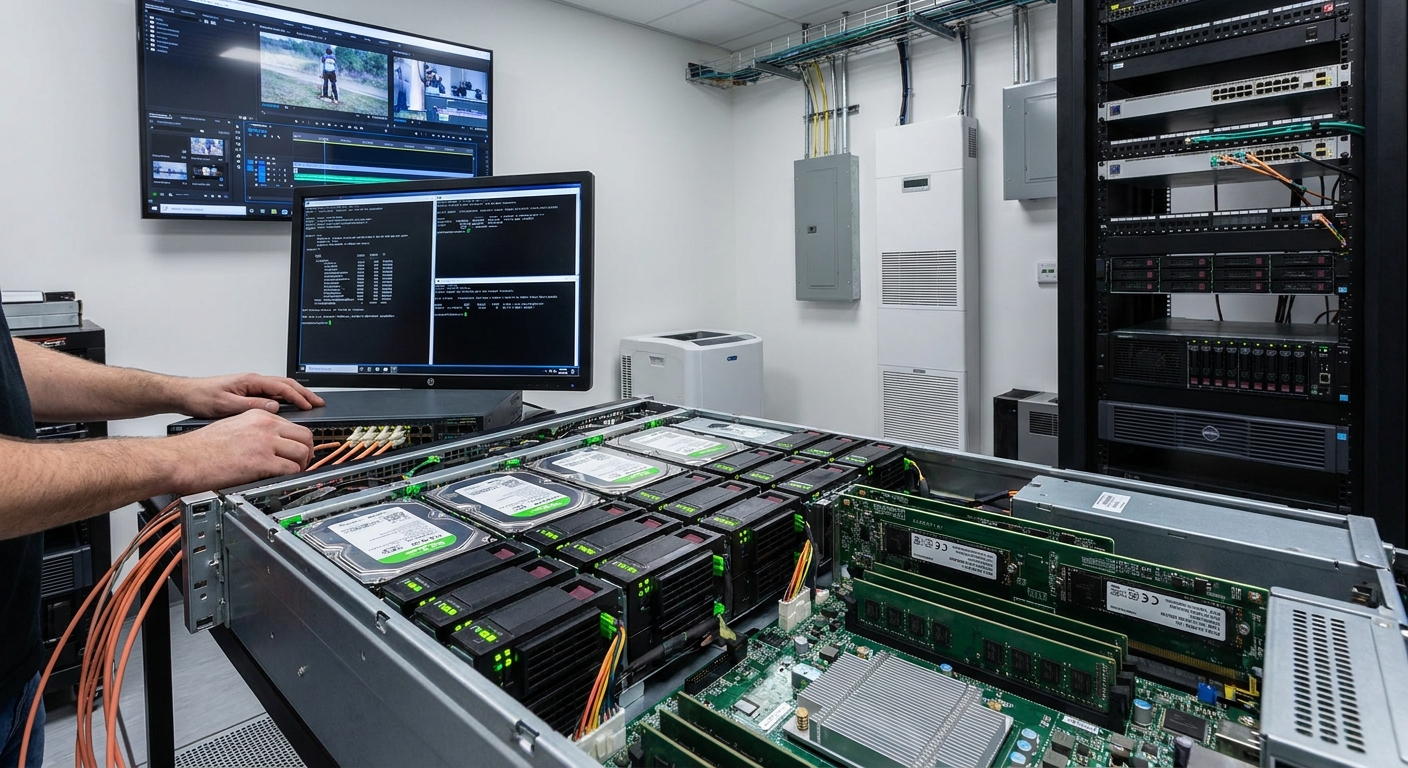
- The Chassis and Drives: We went with a high-density 4U chassis, which gave us plenty of room to grow. We populated it with enterprise-grade Nearline SAS drives. Crucially, we configured these drives in multiple RAID-Z2 pools. This means each group of drives can tolerate two complete drive failures with zero data loss. Splitting the total capacity into several of these smaller pools, instead of one giant one, also gave us a fantastic performance boost by spreading out the I/O operations.
- The Brains of the Operation (Server Specs): The server itself is the heart of the SAN. My unbreakable rule here is that ECC memory is non-negotiable. ECC (Error-Correcting Code) memory is like having a vigilant proofreader for your computer’s short-term memory, preventing silent memory errors from ever being written to your precious disks.
- The Magic of Caching: My personal rule of thumb is to have at least 1GB of ECC RAM for every 1TB of raw storage. This feeds ZFS’s amazing primary read cache (the ARC). To supercharge it, we used high-speed NVMe flash for two very specific jobs: a large L2ARC (a secondary read cache) for frequently accessed files, and a dedicated SLOG device. The SLOG is vital; it acts as an incredibly fast landing zone for small, synchronous writes—like the constant project file saves that video editing software performs—ensuring every click of the ‘Save’ button is instantly and safely committed to storage.
Building the Superhighway: The Network
A high-performance server is useless if it’s connected to the workstations by a dirt road. The studio’s existing 1-gigabit network was an immediate bottleneck. It was like trying to drain a swimming pool through a drinking straw. A full overhaul was our first order of business.
We implemented a dedicated 10-gigabit switched infrastructure, creating a superhighway connecting the new SAN directly to every editing suite. For the protocol, I almost always choose iSCSI in these environments. It gives you the raw, block-level performance editors need (making the network storage feel like a local drive), but it runs over standard TCP/IP, which is far simpler and more cost-effective to manage than something arcane like Fibre Channel.
One of the first tuning steps I always take is enabling Jumbo Frames across the entire path. This simple change allows the network to send data in much larger packets. Think of it as sending your data in bigger trucks, which means fewer trips, less overhead, and a significant boost in real-world throughput. It ensures the network is never the weak link in the chain.
The Implementation Journey: Where the Magic Happens
The journey from blueprint to reality is never a straight line. The first major hurdle was a delicate surgery: migrating over 100TB of live project data with minimal disruption. My go-to process here is a multi-pass approach using a powerful tool like rsync. We did an initial bulk sync over a weekend, then ran smaller, incremental syncs each night to catch the changes, leading up to a tiny final sync at cutover.
But the real artistry comes in during the post-install tuning phase. This is where you dial in the system for the specific workload. For video, this means tuning the ZFS record size to 1MB to optimize for large, sequential files. It’s about meticulously tweaking the cache behavior and iSCSI parameters, then running playback tests with multiple editors, hunting down and eliminating every single dropped frame. This is the part of the job I love—transforming a powerful machine into a perfectly tuned instrument for creativity.
The Payoff: Performance, Resilience, and Peace of Mind
So, what was the result? The transformation was staggering. We measured everything.
- Before: Moving a typical 500GB project folder took well over an hour.
- After: That same transfer took less than 10 minutes.
Benchmarks showed sustained, multi-gigabyte-per-second throughput right to the edit suites. In practical terms, this meant several editors could collaborate on the same complex 4K timeline, in real time, without a single dropped frame. Project load times were slashed by over 75%. The technology finally got out of the way and just worked.
But performance is only half the story. The real deliverable was resilience. We put a multi-layered strategy in place. First, we leveraged one of ZFS’s most incredible features: snapshots. We configured the system to automatically take a read-only snapshot of the entire filesystem every 15 minutes. This is like having a universal ‘undo’ button. An editor accidentally deletes a critical folder? A project file gets corrupted? No problem. We can roll back to a perfectly clean version from just a few minutes ago, instantly.
For true disaster recovery, we used the native zfs send/recv command to replicate the entire dataset, including all those wonderful snapshots, to a secondary server at an off-site location every night. This gives them complete business continuity. If something catastrophic were to happen to the main studio, their entire business—every project, every file—is safe.
Beyond the Tech: The Real Business Impact
When we looked at quotes for proprietary systems that could deliver similar performance, the total cost of our custom ZFS solution was 3 to 4 times lower. That’s a massive ROI right out of the gate. But the real value was in the workflow. By removing the technological friction, we enabled true, real-time collaboration.
The new centralized system dramatically accelerated their project turnarounds, which had a direct commercial benefit: the studio was able to take on more clients and bigger projects without increasing headcount. But ultimately, the biggest benefit isn’t a number you can put on a spreadsheet. It’s the total peace of mind they now have in the integrity and availability of their core business asset.
Final Thoughts
What I hope this case study has made crystal clear is that a properly engineered open-source solution can absolutely deliver performance and data integrity that meets or even surpasses proprietary systems, especially in demanding environments. The secret, if there is one, is holistic planning. It’s about ensuring the hardware, the networking, and the software tuning are all working together in perfect concert.
Today, we celebrated a success story. But it’s just as important to learn from what happens when things go wrong. I hope you’ll join me next time for Episode 24, where we’ll explore some cautionary tales. We’re calling it, “The ‘French’ Alternatives: Why Free Linux Storage HA Can Cost You Your Weekend.”
Thank you for joining me on this deep dive! As always, I love hearing from you. Drop your questions or comments below, and I’ll see you next time.
Leave a Reply